What is Manic Closed Beta
Manic Closed Beta is the first live phase of real-money trading on Manic.
During Beta, eligible users can access their Real Account, deposit real funds, trade with real money, and withdraw real funds, all settled in USDC on Solana mainnet.
More access will be opened over time through future Beta waves and the waitlist.
1. How to Access Your Manic Beta Real Account
At the current stage, Real Account access is only available to users who already have funds in their Real Account.
This includes users who made deposits during Alpha, and users who earned bonus credits through the Alpha Tournament or the SMART Benchmark Campaign.
We will gradually open more spots over time. If you do not have access yet, you can join the waitlist form for a chance to be included in a future Beta wave.
1.1 How to log in
- Visit https://alpha-app.manic.trade/, log in using the same wallet, Google account, email, or X account you used during Alpha. For SMART Benchmark reward users, please log in with the linked X account used during the campaign.

- After logging in, select Real Account from the entry pop-up.

- You can also switch between Demo Account and Real Account from the top-right corner of the app.

1.2 Important note
All activity in Real Account uses real funds. Trades are settled in USDC on Solana mainnet.
2. How to Deposit
To start trading in Manic Beta, you need to deposit funds into your Real Account.
2.1 Supported asset
At the current stage, Manic Beta only supports USDC on Solana for deposits.
Please make sure you are sending USDC on Solana mainnet. Deposits made with unsupported assets or on unsupported networks may not be credited.
2.2 Minimum deposit
The minimum deposit amount is 10 USDC.
Deposits below 10 USDC are not supported.
2.3 Deposit steps
- Enter your Real Account. Click the Deposit button

- Check the supported token and chain:
- USDC
- Solana
- Scan the QR code or copy your deposit address

- Send at least 10 USDC from your external wallet
- Once the transfer is confirmed, the funds will be credited to your Real Account balance
Once the deposit is completed, your Real Account balance will be available for trading.
2.4 Deposit reward
Users whose first deposit is at least 100 USDC can unlock the current Beta deposit reward.
The current reward includes:
- $10,000 demo bonus
- Unlimited demo trades unlocked
- Limited-time zero-fee mainnet trading
3. How to Trade
Trading on Manic is simple. You choose an asset, pick a duration, enter your amount, check the payout multiplier, and predict whether the price will move Higher or Lower by expiry.
3.1 Choose an asset
During Closed Beta, Manic currently supports:
- BTC
- ETH
- SOL
More assets will be added over time

3.2 Choose a duration
Select how long you want the round to last.
During Beta, available durations range from 1 minute to 5 minutes, depending on the market.

3.3 Enter your amount
Choose how much you want to trade.
- Minimum amount: 1 USDC
- Maximum amount: 100 USDC
You can enter the amount manually or use the preset buttons in the trading panel.

3.4 Check the payout multiplier
Before confirming your trade, Manic will show a Payout Multiplier.
This multiplier determines how much you receive if your prediction is correct. It changes dynamically based on the market and Manic’s pricing model, rather than staying fixed.
At expiry, Manic compares the initial price at entry with the future price at expiry and settles the payout automatically on-chain. For a deeper explanation of how payout works, check Manic gitbook.

3.5 Predict Higher or Lower
Choose whether you think the asset price will be:
- Higher at expiry
- Lower at expiry
Once your trade is submitted, the position is locked in for that round.

3.6 When is a trade a win or a loss?
Each trade is defined by:
- the entry price
- the selected duration
- the price at expiry
If your predicted direction matches the final price movement at expiry, the trade wins.
If it does not, the trade loses.

3.7 How settlement works
When the round ends, Manic automatically settles the trade based on the final outcome.
Market pricing and settlement reference data are powered by Pyth, which aggregates price inputs from major exchanges such as OKX and Binance.
If your trade wins, your payout is credited to your account based on the displayed multiplier. If your trade loses, the position expires with no payout. All settlement happens on Solana mainnet.
You can also open Show Positions to review your trade details and find the onchain transaction hash, which can be used to verify the settlement and trade record on-chain.


4. How Leverage Works
On Manic, leverage is expressed through the Payout Multiplier. A higher multiplier gives a higher potential payout but requires a larger price move and is harder to win. The multiplier is dynamic, adjusting to volatility, time to expiry, and target move distance.
During Beta, the multiplier range is currently 1x to 3x. We are starting smaller to test trading behavior under live conditions, and plan to gradually open higher levels, eventually up to 100x.
Important: Manic does not use traditional margin trading. There are no margin calls and no liquidations. Your maximum risk is limited to the amount you enter for each trade. For a more detailed explanation of multiplier logic, check Manic gitbook.

5. How to Withdraw
You can withdraw available funds from your Real Account during Manic Closed Beta.
5.1 Withdrawal flow
- Switch to your Real Account, click the withdraw button

- Enter your recipient Solana wallet address
- Enter the amount you want to withdraw, or tap MAX

- Check your Withdrawable balance before submitting
- Confirm the withdrawal request
If your account has already met the withdrawal requirements, your USDC will be sent to your external wallet after processing.
5.2 Alpha & SMART Benchmark Reward Withdrawal Requirements
Some rewards from earlier Manic campaigns need to meet a trading volume requirement before they can be withdrawn.
5.2.1 Applicable rewards:
- Alpha Tournament Season 1, 2, and 3 milestone rewards
- Alpha trading competition leaderboard rewards
- SMART Benchmark leaderboard rewards
5.2.2 Withdrawal requirement:
To withdraw these rewards, users need to complete 3x trading volume based on the reward amount.
5.2.3 Example:
If you received 5 USDC in rewards, you need to complete at least 15 USDC in trading volume before that reward becomes withdrawable.
5.2.4 How trading volume is counted:
Trading volume is counted based on the order amount when you open a trade.
- Winning trades count
- Losing trades count
- Multiplier / leverage does not increase counted volume
If your rewards are still locked, the Withdraw window will show how much more trading volume is needed before full withdrawal is unlocked.
5.3 Processing and Risk Controls
Most withdrawals are processed without manual review, but processing time may vary depending on Solana network conditions and Manic Beta system status.
Manic reserves the right to delay, review, or suspend withdrawals for accounts involved in cheating, exploit abuse, unauthorized automation, fraudulent reward farming, or other abnormal behavior that violates Beta rules.
5.4 Common Withdrawal Issues
A withdrawal may fail, remain locked, or take longer than expected for reasons including:
- Insufficient withdrawable balance
- Reward trading volume requirement not completed
- Incorrect Solana wallet address
- Temporary Solana network or system issues
- Account flagged for risk review
If your withdrawal does not go through, please first check your withdrawable balance, reward unlock status, and wallet address.
If you still need help, please join our Discord and open a support ticket: https://discord.com/invite/manic-trade
6. Referral Rewards
Invite friends to Manic Beta to unlock referral rewards and VIP benefits.
6.1 Steps
- Go to the Referral page

- Bind your X account and follow @ManicTrade
- Unlock your referral link and referral code
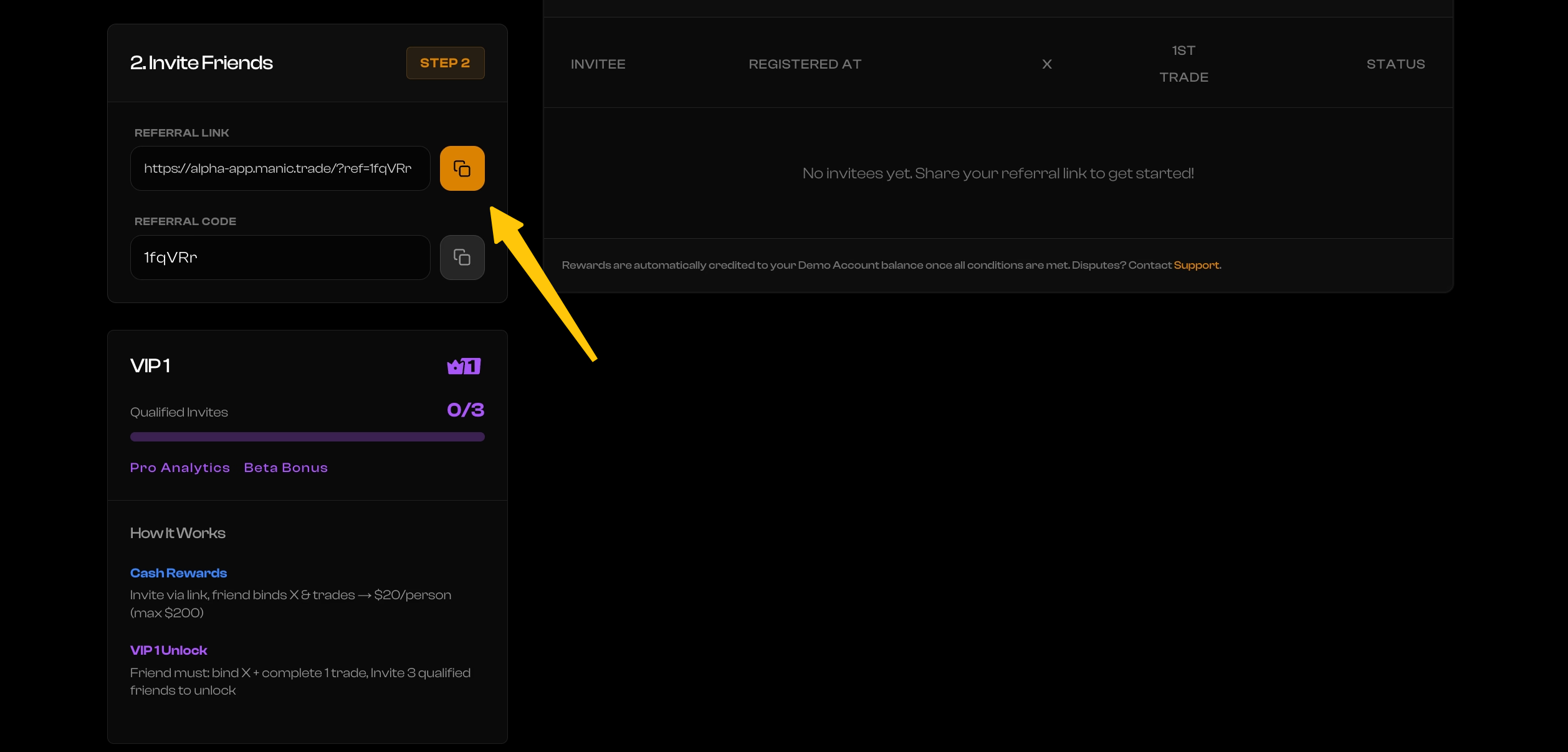
- Copy your referral link or code and share it with friends
- Track your invite records, qualified friends, VIP progress, and rewards on the Referral page
A friend becomes a qualified invitee after they bind their X account and complete the required Real Account trading activity.
6.2 Rewards
Invite 3 qualified friends to unlock VIP 1.
VIP 1 currently unlocks Pro Analytics, with more rewards to be added in the future.
With Pro Analytics, you can:
- Analyze every trade in depth
- Spot high-win modes faster
- Find your best timing, assets, and direction
- Trade smarter and improve your performance

Rewards are automatically credited once the required conditions are met.
You can invite friends to Manic Beta and unlock referral rewards.
7. Risk Disclosure
Manic Closed Beta is still in a testing phase. Product features, rules, supported assets, settlement logic, and withdrawal conditions may continue to evolve during Beta.
Please keep the following risks in mind:
- Real Account uses real funds. Any trade placed in Real Account involves real-money risk.
- Momentum markets can be highly volatile. Prices may move quickly within 1 minute to 5 minutes.
- Payout multipliers increase both potential return and risk. Higher multipliers are harder to win.
- Oracle, settlement, and withdrawal rules may change during Beta as we continue testing and improving the product.
- Do not deposit or trade more than you can afford to lose.
Manic Beta is provided for testing and early access purposes. Nothing in this guide should be considered financial advice.
8. Fair Use and Anti-Abuse Rules
To keep Manic Beta fair for all users, abusive behavior is strictly prohibited.
This includes, but is not limited to:
- Using multiple accounts to farm rewards
- Using bots, scripts, or unauthorized automation to abuse campaigns
- Exploiting bugs, product issues, or system delays
- Manipulating referral, reward, or leaderboard systems
- Creating fake trading activity to unlock rewards
- Any behavior that violates the spirit of Closed Beta
Manic reserves the right to review, delay, restrict, or suspend rewards, withdrawals, or account access if suspicious activity is detected.
If you find a bug or abnormal product behavior, please report it through the Manic Discord instead of exploiting it. Valid bug reports may be eligible for Bug Bounty rewards.